| Users say: |
|
It all worked as advertised! Thanks very much for all your help. It was very much appreciated and I thank you guys for having this forum available to help us out with making sense out of DVD authoring with this great piece of software, DVDRemake Pro! Z
|
|
More...
|
|
|
Prethodni: Ispravi playback .
KAda IfoEdit podjeli originalni disk on zadrži sva poglavlja na disku 1 (kako bi navigacija izbornika ostala valjana). Sva poglavlja prije točke podjele (između 27og i 28og poglavlja)pokazuju na iste programe kao što su pokazivali na originalu. Sva ostala poglavlja (počevši od 28og) pokazuju na zadnje dostupno poglavlje na prvom disku (27). Moramo promijeniti poglavlja da pokazuju na prave programe u PGC14.
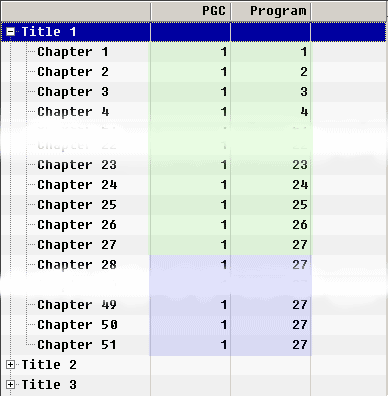
To je poprilično jasno, ali postoji jedna stvar na koju treba paziti: nisu svi programi nužno poglavlja. Postoji mogućnost da imate primjerice 10 programa u PGC-u, samo 5 (za primjer) poglavlja. Ali to nije slučaj sa našim diskom:
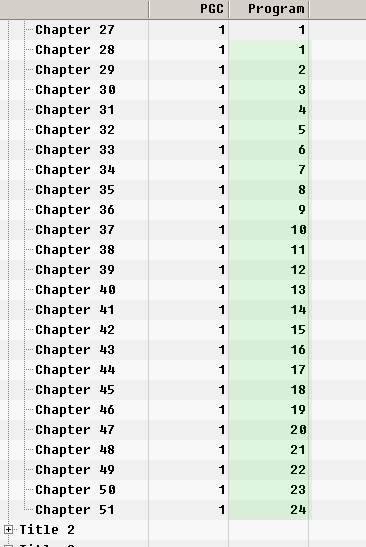
Kao što vidimo nema praznine u broju programa na drugom disku.
Pa odaberemo VTS1/Titles1 I idemo kroz sva poglavlja koja zahtijevaju promjenu. Jednostavno dvostruko kliknite (ili kliknite sa desnom tipkom i "edit chapter") I promijenite PGC/Program kombinacije tako da novi programi pokazuju na novi PGC.
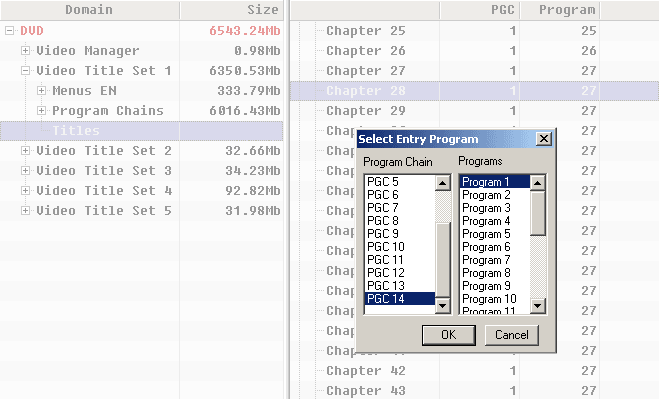
Kada završimo sa svim poglavljima imati ćemo nešto poput ovoga.
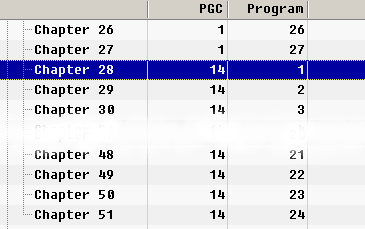
To je to. Gotovi smo sa spajanjem dva poprilično složena podijeljena diska. Sada možete izvesti disk i snimiti na DVD sa vašim najdražim programom za snimanje. (U ovom konkretnom slučaju disk je veći nego DVD5, pa trebate poduzeti nešto u vezi toga, osim ako nemate pržilicu koja podržava dvoslojne medije).

|










 Copyright ©2003-2019 DimadSoft. All rights reserved.
